Tuesday, December 09, 2008

Ember 0.5.5 released!

I meant to publish this post almost a month ago, but never got around to it. Better late than never though...
I finally did the release of Ember 0.5.5 some days into December.

Among the usual slew of bug fixes and overall improvements one of the major new features is the compass. I've written about that before on this blog, and I'm really pleased with how it turned out. It's currently very basic, but I have all kinds of plans for it in the future. Hopefully it will right now help people getting oriented in the world.
This video shows the compass in action.

Another big change was the upgrade to Ogre 1.6. While it might not result in any immediate improvements to the client, it has a much improved script parsing engine and resource management. The latter is extremely useful for us since we now finally can do away with the complex concept of having separate "user" and "system" media. This separation was forces because of earlier versions of Ogre's inability to correctly handle duplicate materials. Instead of letting the client handle the clashes Ogre threw an exception and totally corrupted the internal resource state. Not so any more though. The advantages of this will better be shown in the next release.

We've also added a lot of fixes and improvements to the entity creator. It's still not completely functional though since it's missing proper model preview functionality, something which will be fixes with the next release of Eris (which the next release of Ember will depend on).
Alexey and Thomas also worked on improving the OSX support, to a point where Ember now correctly builds and runs on OSX. Unfortunately it turned out to be a little harder to create a contained package with all dependent libraries. I'm confident that it will be sorted though.

Monday, December 01, 2008

A new compass and minimap

The last couple of weeks I've been working on getting a working compass and minimap into the client. Since the world is extremely dynamic and not known to the client beforehand it's a little bit more complex than one would think. In a game where the world is known in beforehand, it's simply just a matter of slapping a prerendered or hand drawn texture of the world onto a square polygon and show that as the map. That's not something that we can do however as the world is totally dynamic and can be changed at any time. Our setup is instead a little bit more complex.
We want to render the world as it is, but we don't want to have to re-render it each frame, since that would bring the frame rate down. In addition, in order to get the water line properly rendered we must render all terrain tiles in the highest LOD-level. That means sending a lot of polygons to the gfx card (this could however be alleviated in the future by using shaders).
The current setup is therefore to place a camera far up in the sky, looking down. The camera uses orthographic projection, which means that objects won't be smaller as they are futher away. This is crucial for the map perspective, since else it will look just like a regular camera looking down.
We then render from this camera into a texture, 512x512px. This provides us with a snap shot of the current world, minus some foliage which we don't render. In most cases this looks pretty good. Finally we then define a smaller area, 128x128px, which is what we show in the compass. By panning this area within the larger texture we can scroll the map, and only have to update the render when the smaller area reaches the border of the larger texture. When that happens we re-center the camera and do a new render.
In this way we get a nifty compass map which doesn't have to be rerendered each frame.

Finally we need to provide a small arrow in the middle to show the position the camera is facing. The problem here is that CEGUI currently doesn't support rotation of windows, so the solution here is to leverage Ogre. We start with an arrow image which we then slap onto a full screen quad. This quad is then rotated to fit the direction of the camera and rendered into a texture, which is then sent to CEGUI, made into a gui element and placed on top of the compass. It all works splendidly, but there are some extra indirections which might bring the performance down a little bit.

All in all the compass is working pretty well now. There are some minor issues with it sometimes not being correctly updated when terrain pages change, and the buttons for zooming in and out could be made better, but it's pretty much ready for release.
Currently it only works as a simple minimap, but the plan is to add functionality for showing direction markers for interesting entities. We could probably reuse some of the functionality currently used for showing the labels.

With the compass now in place the 0.5.5 release is pretty much feature complete. I plan to get a beta build out this weekend.


Sunday, November 02, 2008

Quickly creating worlds

I spent some hours just trying the world editing features of Ember out. The main reason was that Jayr had provided a couple of really nifty castle wall sections meshes. With section meshes it's possible to build more complex structures, very much like with LEGO. We currently have three sets of section meshes: a wooden fence, a low stone wall and now a larger castle wall.
I first started by just placing the wall segments next to each other directly on the ground. It looked like this:
The main problem here is that the uneven ground makes the segments not match up. It's not looking very good. And if a player would be walking on top of the wall it would look strange indeed.
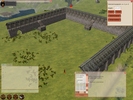
One of the Google Summer of Code project was however to add support for terrain mods to both the server and the client. A terrain mod is modification to the terrain which will alter it in some way from it's initial, base point generated shape. So in this case the natural terrain mod to use would be a level mod, which makes sure that a certain area of the terrain is leveled. After applying a level mod the wall looks like this instead. Much better. As can be gleamed from the screenshot we have four different kinds of wall sections: a gate, a simple wall segment, a wall segment with a staircase and a corner segment. By combining these it's pretty easy to quickly create a larger wall.
One thing that I found was that it's quite hard to place the wall segments next to each other so that there's not gap, or no overlapping. We therefore need to add some kind of "snap-to" functionality, as specified in this blueprint.
The scaling of the wall segments seems to be a little off though, as this screenshot shows.
After the wall had been completed I added a little path leading up the castle, a small graveyard enclosed by a low stone wall and an inn and a small cottage near the path. The path required some low level entity editing as we don't have any gui for altering areas yet. But adding and positioning the other entities is really, really easy. The cyphesis server doesn't currently have support for loading back entity data that has been persisted (though it has support for writing data to the database), so unfortunately the world got discarded when I shut down cyphesis. The main point of this little exercise was to see how easy it would be to alter the world. There are two areas that need some more love though:

There's an even greater collection of screenshots to be found here.